In this world it is much easier to hear the echo than the answer.
Echos
The GHOUL has a few echo() related functions that are useful for debugging and for printing information to the console window. The native echo() is somewhat dull but luckily accepts HTML tags, which the routines and functions below make good use of.
Some of these echo functions are sensitive to the state of one of the special variables $Verbose and $Debug; Boolean switches that can be set to true or false in your top-level script. Although all of them can return any value, they default to 0, and finally, all contain a Boolean test that mutes the echo() if false.
All four functions in the table below can be added to any operand in equations without affecting the result—as can the native echo()—or indeed, they can replace an operand, and their value set to, well, whatever you like…
They all also have identically named modules which can thus be used in a 'stand-alone' fashion.
| Function | Returns | Sensitivity | Boolean test |
|---|---|---|---|
Alert() |
Value [0] |
— |
yes |
Debug() |
Value [0] |
$Debug |
yes |
Echo() |
Value [0] |
$Verbose |
yes |
Print() |
Value [0] |
— |
yes |
Alert()
Alert(StringsTuple,Boolean=true,Value=0)
-
StringsTuple, tuple, strings or numerical values, or any combination thereof.
-
Boolean, Boolean, defaults to true, condition for displaying the alert.
-
Value, defaults to 0, value to be returned.

|
Since 2021.1, the console no longer renders html font tags, so the beautiful colours and bold print you see here in the images is a thing of the past. Apparently that’s what they call 'improvement'… SMFH. |
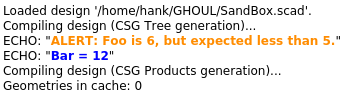
Alert() prints a message to the console window. It will only print when Boolean equates to true (which is the default). Alert() returns a value, by default 0, and can be used in an expression like in the example below. It is meant to alert the user when a result or parameter has a value that is 'surprising but not catastrophic'.
Alert.scad also contains an Alert() module, which takes the same parameters, and can be used as a stand-alone statement.
Foo=6;
Bar=Foo*2+Alert(["Foo is ",Foo,", but expected less than 5."],Foo>=5);
Echo(["Bar = ",Bar]);
Debug()
Debug(StringsTuple,Boolean=$Debug,Value=0)
-
StringsTuple, tuple, strings or numerical values, or any combination thereof.
-
Boolean, Boolean, defaults to $Debug, condition for displaying the alert.
-
Value, defaults to 0, value to be returned.
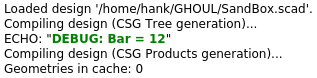
Debug() is—not surprisingly—intended for debugging. It prints a message to the console window, as long as $Debug=true; is in your top-level file (it’s set to false in Config.scad). If it becomes desirable to switch off the debug messages at some point during development, simply declare $Debug=false;.
Bar=12;
Debug(["Bar = ",Bar]);

//  In a function, simply use it in a 'let()' statement or in the expression itself.

function FooBar(Baz)=
    let(
        Bar=7+Debug([Baz])
    )
    Debug(["Bar = ",Bar],Bar)
;
Echo()
Echo(StringsTuple,Boolean=$Verbose,Value=0)
-
StringsTuple, tuple, strings or numerical values, or any combination thereof.
-
Boolean, Boolean, defaults to $Verbose, condition for displaying the alert.
-
Value, defaults to 0, value to be returned.
Echo() prints a message to the console window, just like the native echo(), and—like it’s GHOUL brothers and sisters — it accepts a tuple of any number and combination of values and strings to print.
It is $Verbose sensitive, and should therefore be used for optional user feedback only. Declare $Verbose=true; in your top-level file to see the echo messages. Echo() returns a value, by default 0, and can therefore also be used in an expression.
Bar=3;
Baz=4+Echo(["This is Bar: ",Bar,"."],Bar);
Echo(["And Foo is: ",3*Baz,"."]);

ECHO: "This is Bar: 3."
ECHO: "And Foo is: 21."
ErrorOnFalse()
ErrorOnFalse(StringsTuple,Boolean)
-
StringsTuple, tuple, strings or numerical values, or any combination thereof.
-
Boolean, Boolean, condition for halting execution.
ErrorOnFalse() is not $Verbose or $Debug sensitive, it prints a message to the console window and uses assert() to halt execution of the script when Boolean=false, if Boolean=true, it keeps quiet and returns true. This allows you to do:
if(ErrorOnFalse("Aperture too small", Aperture>2.8))
    DoSomethingWhenApertureIsOkay()
Here’s an example using the module; as you can see in the image below, I’m using The GHOUL’s SandBox.
Baz=6;
ErrorOnFalse(["Config error: Baz = ",Baz," in FooBar.scad, line 126."],Baz<5);
ErrorOnTrue()
ErrorOnTrue(StringsTuple,Boolean)
-
StringsTuple, tuple, strings or numerical values, or any combination thereof.
-
Boolean, Boolean, condition for halting execution.
ErrorOnTrue() is ErrorOnFalse() but true… It is not $Verbose or $Debug sensitive, and prints a message to the console window and uses assert() to halt execution of the script when Boolean=true, as you already suspected, and returns false, without any comment when Boolean=false.
FallBack()
FallBack(Test,TrueValue,FalseValue,StringsTuple,Boolean=$Verbose)
-
Test, Boolean expression, test condition and fall-back when false.
-
TrueValue, value to be returned when Test==true.
-
FalseValue, value to be returned when Test==false.
-
StringsTuple, tuple, strings or numerical values, or any combination thereof.
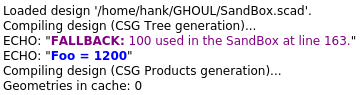
FallBack() is the odd one out here; it’s message to the console window is really secondary to it’s main use: providing a fall-back value 'safety net' in case a parameter goes out of range. The message is by default $Verbose sensitive, although this can be replaced with another condition, but it will always provide the fall-back value when Test equates to false, regardless of the value of Boolean.
There is no FallBack() module, because that just wouldn’t make any sense…
Bar=12;

/*
  The code below this comment is equivalent to:
    Foo=Bar<10
        ?   Bar*10
        :   100+Echo("Fallback: 100 used in the SandBox at line 163."); //  Echo() returns '0'
*/

Foo=Bar*FallBack(Bar<10,Bar*10,100,["100 used in the SandBox at line 163"]);
Echo(["Foo = ",Foo]);
And yes, of course max(Bar*10,100) is simpler, but it doesn’t give you an alert, and I needed to give you an example, didn’t I? And no, I’ve never used FallBack(), to the best of my knowledge…
Print()
Print(StringsTuple,Boolean=true,Value=0)
-
StringsTuple, tuple, strings or numerical values, or any combination thereof.
-
Boolean, Boolean, condition for displaying the alert, defaults to true.
-
Value, value to be returned, defaults to 0.
Print() is The GHOUL’s default echo routine. It will print to the console unless Boolean equates to false. Print() returns a value (Default is 0) to maintain uniform behaviour with the other functions here.
Stop()
Stop(Stringstuple=[],Boolean=false)
-
StringsTuple, tuple, strings or numerical values, or any combination thereof.
-
Boolean, Boolean, execution is only halted when Boolean is false.
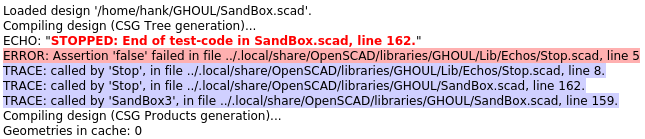
Stop() prints a message to the console window and uses assert() to halt execution of the script if and when Boolean equates to false. It is not $Verbose or $Debug sensitive.
It is a useful routine during certain debugging situations to find where a piece of code breaks the execution of the script.
Stop.scad also contains a Stop() module, which takes the same parameters and can thus be used as a stand-alone statement.
Stop(["End of test-code in SandBox.scad, line 162."]);