The whole is greater than the sum of its parts.
Parts
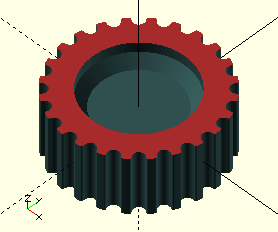
GTPulley()
GTPulley(Teeth, Width, Type="GT3-2")
-
Parameter, description
-
Teeth, number of belt teeth of the pulley (determines shape).
-
Teeth>0a tooth shaped to the PCD calculated for a pulley of the given number of teeth. -
Teeth=0a straight tooth (like a rack).
-
-
Clearance, provides more height (IBelt) outside of the pitch line when making a cutting body for example in a belt tensioner.
Generate a GT belt tooth polygon, either straight, or conforming to the appropriate PCD (Pitch Circle Diameter). The generated tooth is placed centered on the positive x-axis with the center of it’s PCD on the origin so only linear extrusion along the z-axis and copying into a circular array is required to complete a cutting body for a pulley, or a captive slot for a belt-end in a belt-tensioner. Currently only 2 mm. and 3mm. pitch GT3 belts are implemented, with more to follow.
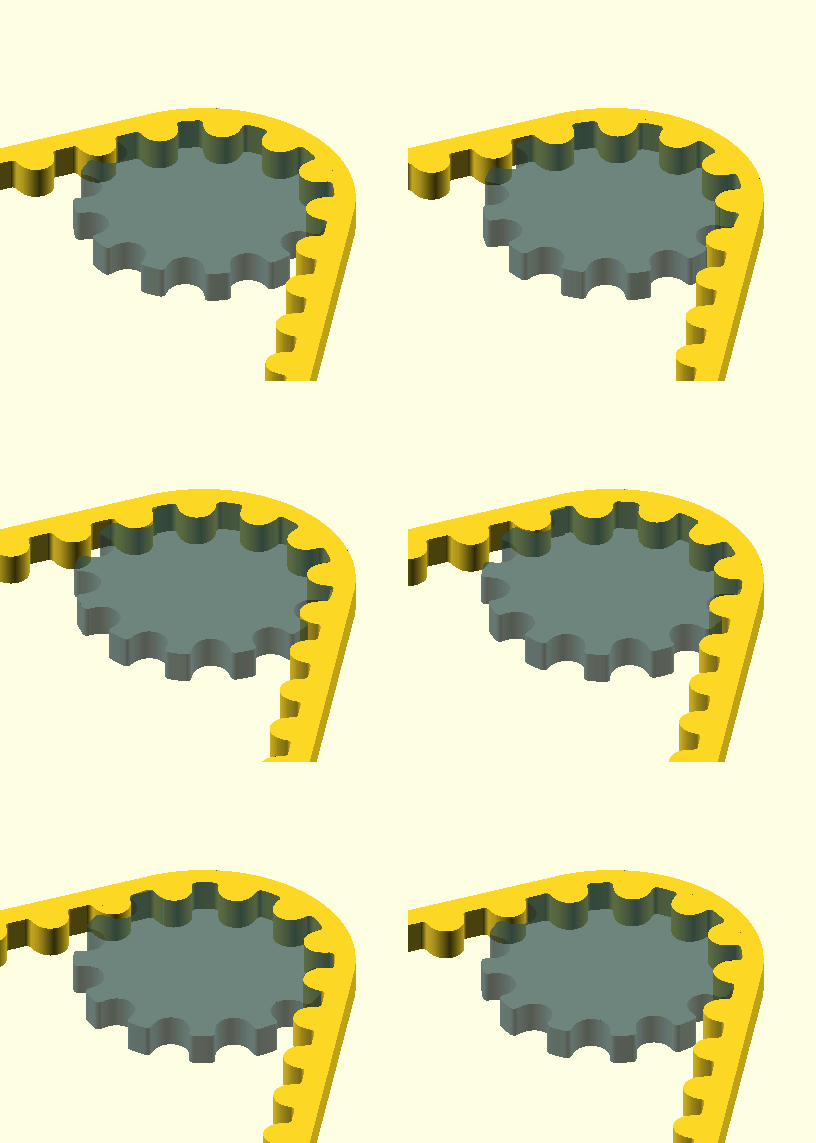
A word to the wise: The belt-tooth and pulley routines are not finished and subject to change pending some test runs. The pulley tooth shape generated by this routine makes the assumption that the belt flexes mainly over the groove portion and little to none over the tooth. This is a fair assumption. The GT3 belt tooth profile is well published, however the same can not be said about the pulley profile. After plowing through a pile of US patents (here’s an idea: let’s write this in the most convoluted constructs possible; that’ll slow the copy-cats down :-/) and manufacturer data (better but still useless), I’m reasonably confident that the pulleys generated by this routine will serve their purpose well.
I have some trial runs planned, and should practice prove theory wrong —as it has done many times before— things may yet change. I will also test 'square' grooves as opposed to moulded to the tooth profile, I have a sneaking suspicion that they may be very effective.
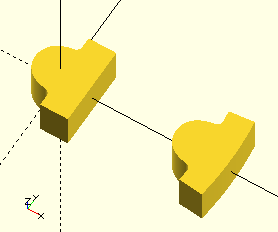
GTTooth()
GTTooth(Teeth, Type="GT3-2", Clearance=0)
-
Teeth, number of belt teeth of the pulley (determines shape).
-
Teeth>0a tooth shaped to the PCD calculated for a pulley of the given number of teeth. -
Teeth=0a straight tooth (like a rack ).
-
-
Clearance, provides more height (IBelt) outside of the pitch line when making a cutting body for example in a belt tensioner.
Generate a GT belt tooth polygon, either straight, or conforming to the appropriate PCD (Pitch Circle Diameter). The generated tooth is placed centered on the positive x-axis with the center of it’s PCD on the origin so only linear extrusion along the z-axis and copying into a circular array is required to complete a cutting body for a pulley, or a captive slot for a belt-end in a belt-tensioner.
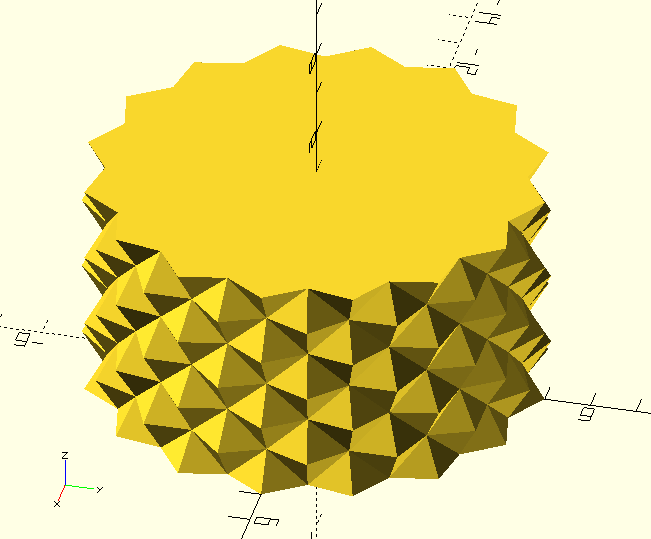
KnurledCylinder()
KnurledCylinder(Radius=5, Height=5, Size=2, Peak=0.5)
-
Radius, outside radius of the knurled cylinder (top of the knurling).
-
Height, height of the knurled cylinder.
-
Size, size of the knurling 'pyramid' sides.
-
Peak, height of the knurling 'pyramids'.
Generate a knurled cylinder on the positive x-axis. At this moment there are no refinements such as a chamfered end &c. Simply use difference() or intersection() operations. This may change in the future. The knurling provides a great non-slip surface for knobs &c.
Thread
Threads are a big deal. Well, it’s a lot of writing and pictures anyhow, enough to make it worthy of it’s own page here:
Thread().
However, there is also a perfectly fine SimpleThread() module family that will generate threads and threaded objects such as studs, bolts and nuts for many everyday applications if you don’t need the kind of control and associated complexity that 'exotic' threads require.
SimpleThread()

|
If you’re even THINKING of printing 'load bearing' threads: Get the hell out of here! If you’re sick enough to even CONSIDER printing NPT threads for an application in ANY piping, containing ANY TYPE of gas under EVEN THE SLIGHTEST PRESSURE: You need SERIOUS help; have yourself committed! Have you EVER witnessed 'just a garden hose' that blew apart? Do you have kids or pets? Do NOT even THINK about using printed threads for ANY pressure applications. Not even in the garden. You sick, horror of a being. For all others; please be aware of the limitations of printed objects. Do NOT rely on the mechanical strength or integrity of printed objects in ANY application where failure of that object presents ANY KIND OF RISK. There, you have been warned, I wash my hands in innocence. |
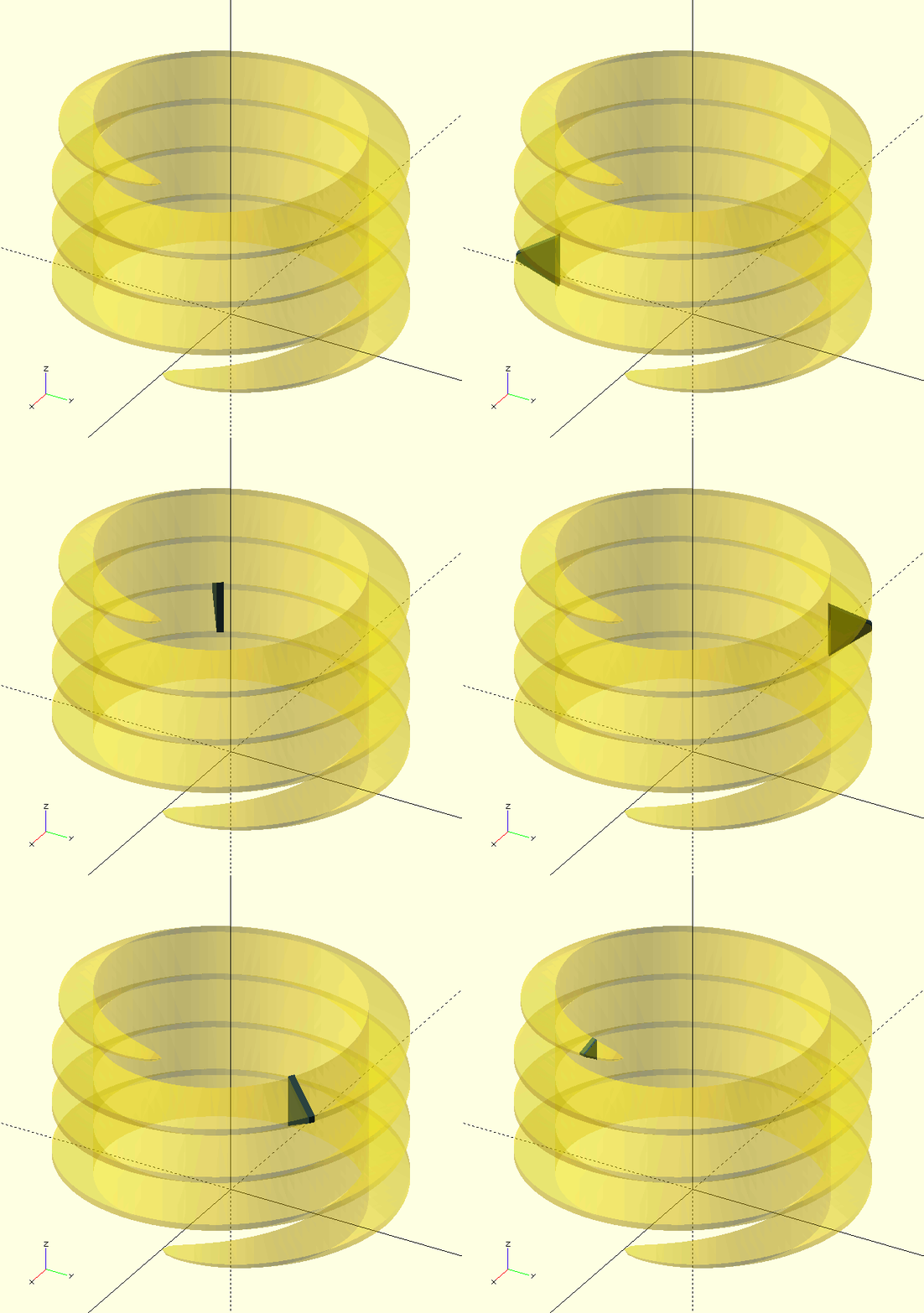
SimpleThread(Turns=4, Diameter=10, Pitch=4, Internal=false, Angle=60, Root=1/4, Crest=1/8, LeftHanded=false, BeginHigbee=0.25, EndHigbee=0.25, HigbeePower=0.5, Correction=0, _ProductionTolerance=-0.01)
-
Turns, scalar, number of turns of the thread helix.
-
Diameter, scalar, major diameter of the thread. See Wikipedia for info on threads.
-
Pitch, scalar, pitch of the thread, see Wikipedia.
-
Internal, Boolean, internal thread is generated if true.
-
Angle, scalar, degrees, included angle of the thread profile flanks, see Wikipedia.
-
Root, fraction, root dimension, given as a fraction of Height.
-
Crest, fraction, crest dimension, given as a fraction of Height.
-
LeftHanded, Boolean, lefthanded thread is generated if true.
-
BeginHigbee, scalar, degrees of Higbee at the start of the thread.
-
EndHigbee, scalar, degrees of Higbee at the start of the thread.
-
HigbeePower, fraction, generates a rounded Higbee instead of a 'linear' reduction, default is 0.5.
-
Correction, scalar, shift (positive or negative) added to the thread-profile to provide additional clearance or interference (in actual units, negative values remove material and provide [more] clearance).
-
_ProductionTolerance, scalar, shift (usually negative) added to the thread-profile to provide [additional] clearance to make up for inaccuracies or lack of resolution in the production equipment, i.e., the 3D printer (in actual units).
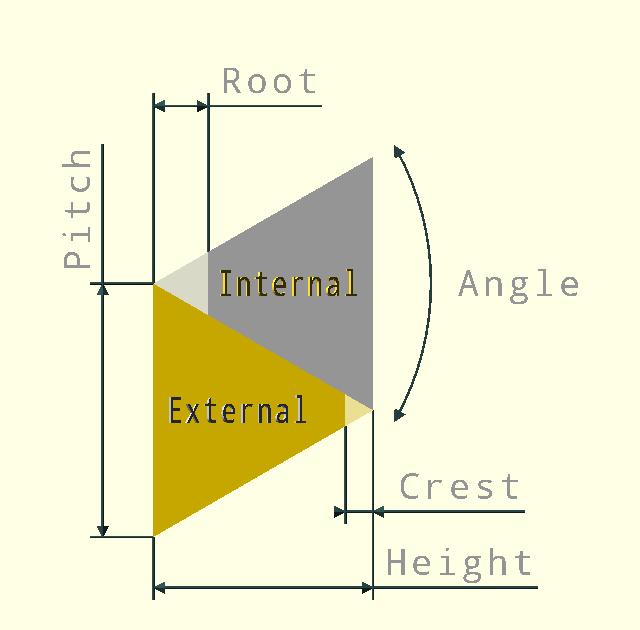
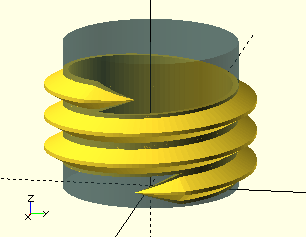
SimpleThread() provides a quick and simple method to generate a machine thread. Instead of relying on lookup-tables or the like, the thread-profile is defined by the user (that’s you) with Pitch, Angle, Crest and Root, see
Wikipedia for info on threads. The default values create an ISO/UTS thread-form, used by Metric and ANSI threads like UNC and UNF.
The term Higbee is used here very loosely; a simple tapered reduction of the thread profile by scaling is formed instead of a true Higbee cut, i.e., the blunt planar cut, tangential to the root diameter, as patented by Mr Clinton A. Higbee in 1891.
The thread profile starts centered on the X-Y plane, if a start from Z=0 is required, raise the threads by Pitch/2, i.e., translate([0,0,Pitch/2]).
To make internal threads mesh with external threads, the finished threads need to be rotated by half a turn, relative to each other, i.e., rotate([0,0,180]).

|
Where some of the following Simple… routines use SimpleThread() and share some of it’s parameters; they are not explained again unless the application differs or there is a salient detail to be shared. Please refer to the definitions already provided above.
|
SimpleThreadedHole()
SimpleThreadedHole(Depth,Diameter,Pitch,Angle,Root,Crest,LeftHanded,
BeginHigbee,HigbeePower,CounterSink,Correction,_ProductionTolerance)
-
Depth, scalar, depth of the threaded hole.
-
BeginHigbee, scalar, degrees of Higbee at the start of the thread, the full thread runs to the bottom of the hole, so there is no EndHigbee.
-
CounterSink, Boolean, the hole’s edge is chamfered if true.
-
See under
SimpleThread()for all other parameters.
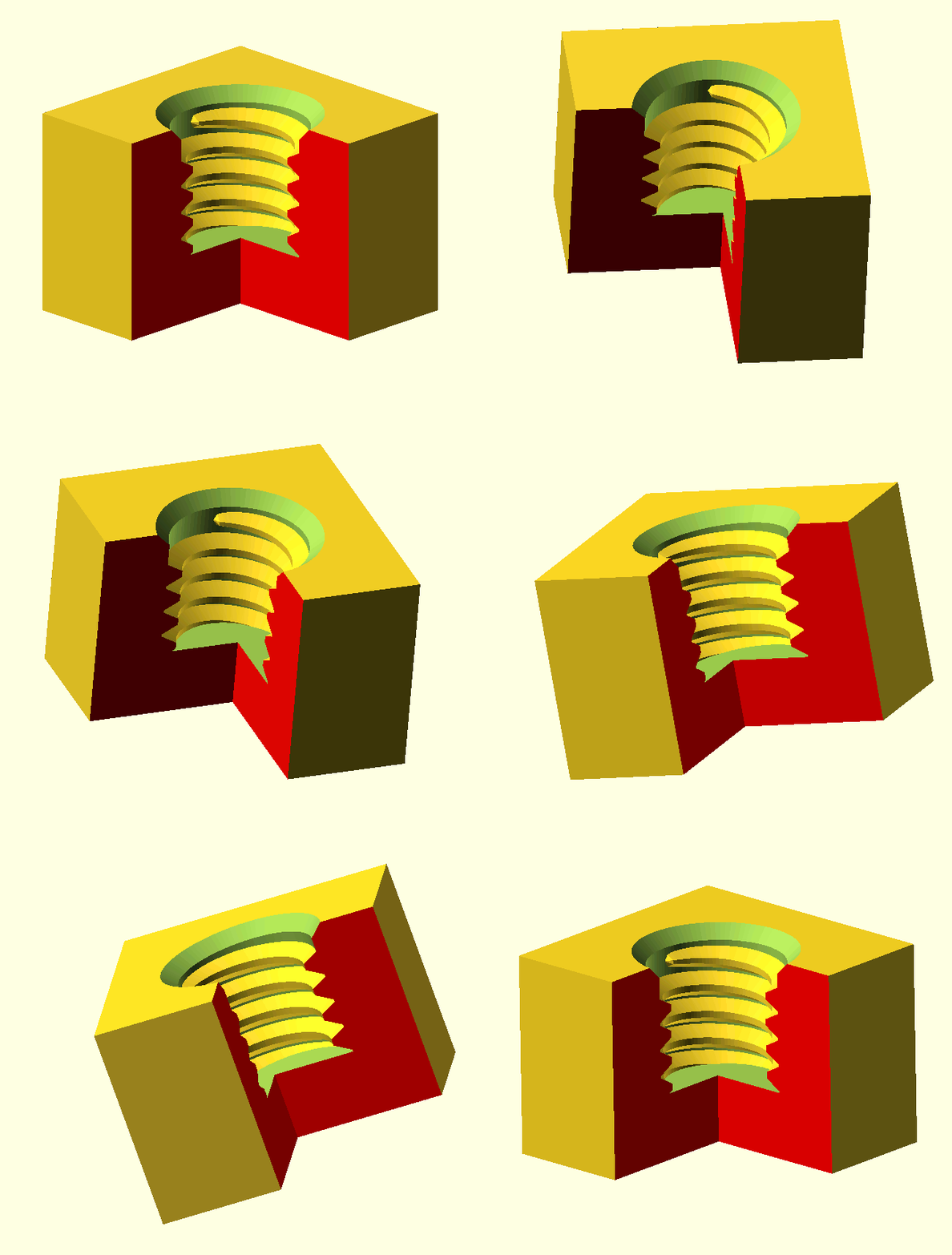
This module creates—what else—a simple, blind threaded hole cutting body, i.e., the negative shape. This can then be used in a difference() operation with any object to create the actual threaded hole. The insertion point is the origin, with the cutting body pointing up in the direction of the positive Z-axis.
difference(){
    cube([20,20,20]);
    SimpleThreadedHole(Depth=10,Diameter=10,Pitch=1.5);
}
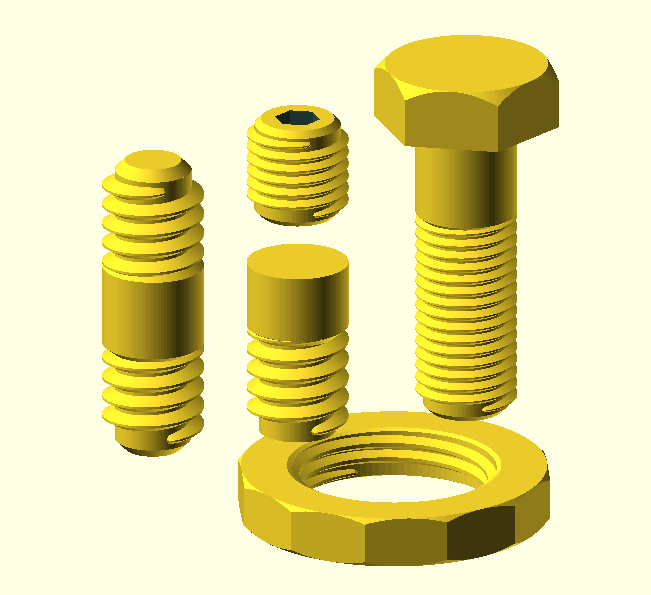
SimpleThreadedRod()
SimpleThreadedRod(Length, Threads, Diameter, Pitch, Angle=60, Root=1/4, Crest=1/8, LeftHanded=false, BeginHigbee=0.2, HigbeePower=0.2, StartTaper=true, Stud=false, Correction=0, _ProductionTolerance=-0.01)
-
Length, scalar, length of the (partially) threaded rod.
-
Threads, scalar, length of the threaded part of the rod, the remainder of the rod will be a plain shank.
-
BeginHigbee, scalar, degrees of Higbee at the start of the thread, if the rod is a stud, the same value is used at the opposite end, so there is no EndHigbee.
-
StartTaper, Boolean, the core diameter (Minor Thread Diameter) is chamfered if true.
-
Stud, Boolean, the rod is made symmetrically if true; both ends are threaded with a plain shank in the middle, or, if the Threads value is more than half the rod length, the entire rod is threaded.
SimpleBolt()
SimpleBolt(Size, Head, Sides, Length, Threads, Diameter, Pitch, Angle=60, Root=1/4, Crest=1/8, LeftHanded=false, BeginHigbee=0.2, HigbeePower=0.2, StartTaper=true, Correction=0, _ProductionTolerance=-0.01, TopChamfer=true, BottomChamfer=false)
-
Size, scalar, dimension of the wrench that would fit the bolt-head.
-
Head, scalar, height of the bolt-head.
-
Sides, integer, number of sides of the bolt-head; usually 6.
-
Length, scalar, length of the bolt, excluding Head.
-
Threads, scalar, length of the threaded part of the bolt, the remainder of the bolt-shank will be a plain.
-
TopChamfer, BottomChamfer, Booleans, the respective part of the bolt-head is chamfered if true.
SimpleNut()
SimpleNut(Size, Height, Sides, Diameter, Pitch, Angle=60, Root=1/4, Crest=1/8, LeftHanded=false, BeginHigbee=0.2, HigbeePower=0.2, Correction=0, _ProductionTolerance=-0.01, TopChamfer=true, BottomChamfer=true, InChamfer=0.25)
-
Height, scalar, height of the nut.
-
InChamfer, fraction, the chamfer of the internal diameter edges, expressed as a fraction of the Pitch, values of 0.25 and less work well.